

| 일 | 월 | 화 | 수 | 목 | 금 | 토 |
|---|---|---|---|---|---|---|
| 1 | ||||||
| 2 | 3 | 4 | 5 | 6 | 7 | 8 |
| 9 | 10 | 11 | 12 | 13 | 14 | 15 |
| 16 | 17 | 18 | 19 | 20 | 21 | 22 |
| 23 | 24 | 25 | 26 | 27 | 28 | 29 |
| 30 | 31 |
- happycgi
- 홈페이지제작
- #jQuery
- 해피씨지아이
- #cgimall
- 홈페이지
- #쇼핑몰
- javascript
- #홈페이지제작
- CGIMALL
- #CSS
- 이미지
- #image
- #동영상
- #이미지
- #happycgi
- #뉴스
- CSS
- 게시판
- php
- jquery
- #홈페이지
- #해피CGI
- 솔루션
- #웹솔루션
- 해피CGI
- 웹솔루션
- #솔루션
- #업종별
- 사이트제작
- Today
- Total
웹솔루션개발 26년 노하우! 해피CGI의 모든것
[해피CGI][cgimall] 반응형이 지원되는 이미지 슬라이드 Responsive Image Slider 본문
[해피CGI][cgimall] 반응형이 지원되는 이미지 슬라이드 Responsive Image Slider
해피CGI윤실장 2026. 6. 10. 09:07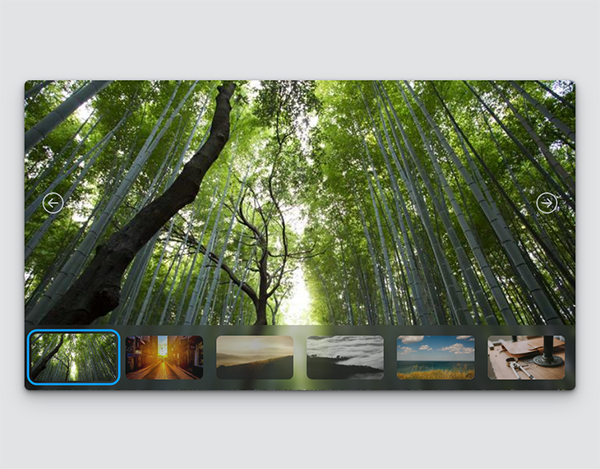
디바이스 환경에 따라 슬라이드의 크기가 변경됩니다.
HTML 구조
<div class="image-slider">
<section class="slider__content">
<button type="button" class="slider-control--button prev-button">
<svg width="16" height="16" fill="currentColor" class="icon arrow-left-circle" viewBox="0 0 16 16">
<path fill-rule="evenodd" d="M1 8a7 7 0 1 0 14 0A7 7 0 0 0 1 8m15 0A8 8 0 1 1 0 8a8 8 0 0 1 16 0m-4.5-.5a.5.5 0 0 1 0 1H5.707l2.147 2.146a.5.5 0 0 1-.708.708l-3-3a.5.5 0 0 1 0-.708l3-3a.5.5 0 1 1 .708.708L5.707 7.5z" />
</svg>
</button>
<main class="image-display"></main>
<button type="button" class="slider-control--button next-button">
<svg width="16" height="16" fill="currentColor" class="icon arrow-right-circle" viewBox="0 0 16 16">
<path fill-rule="evenodd" d="M1 8a7 7 0 1 0 14 0A7 7 0 0 0 1 8m15 0A8 8 0 1 1 0 8a8 8 0 0 1 16 0M4.5 7.5a.5.5 0 0 0 0 1h5.793l-2.147 2.146a.5.5 0 0 0 .708.708l3-3a.5.5 0 0 0 0-.708l-3-3a.5.5 0 1 0-.708.708L10.293 7.5z" />
</svg>
</button>
</section>
<nav class="slider-navigation">
<button class="nav-button" aria-selected="true">
</button>
<button class="nav-button" aria-selected="false">
</button>
<button class="nav-button" aria-selected="false">
</button>
<button class="nav-button" aria-selected="false">
</button>
<button class="nav-button" aria-selected="false">
</button>
<button class="nav-button" aria-selected="false">
</button>
</nav>
</div>
CSS 소스
*,
*::after,
*::before {
margin: 0;
padding: 0;
box-sizing: border-box;
}
:root {
--active-color: hsl(204 100 53);
--bg-color: #e1e3e5;
--icon-default: hsl(203 5 75);
--icon-accent: hsl(203 15 98);
--navigation-color: hsl(203 5 25 / 0.3);
}
body {
min-block-size: 100vh;
display: flex;
justify-content: center;
align-items: center;
background-color: var(--bg-color);
}
.image-slider {
display: flex;
flex-flow: column;
width: clamp(360px, 96vw, 830px);
aspect-ratio: 16 / 9;
min-height: 300px;
overflow: hidden;
border-radius: 8px;
container-type: inline-size;
contain: content;
background-color: #0006;
box-shadow: rgba(0, 0, 0, 0.2) 0px 1px 2px, rgba(0, 0, 0, 0.3) 0px 2px 4px,
rgba(0, 0, 0, 0.25) 0px 4px 8px, rgba(0, 0, 0, 0.2) 0px 8px 16px,
rgba(0, 0, 0, 0.15) 0px 16px 32px;
}
.slider__content {
flex-grow: 1;
display: flex;
justify-content: space-between;
}
.slider-control--button {
border: 0;
background: 0;
outline: 0;
cursor: pointer;
place-content: center;
padding-inline: 3vw;
z-index: 1;
display: grid;
}
.icon {
height: 2rem;
width: 2rem;
fill: var(--icon-default);
border-radius: 50%;
}
.slider-control--button:where(:hover) {
background-image: linear-gradient(
to var(--position),
#0000 0%,
#0002,
80%,
#0006 100%
);
.icon {
fill: var(--icon-accent);
background: #0001;
}
}
.slider-control--button:active {
outline: 0.2em solid hsl(204 100 53);
outline-offset: -0.5em;
}
.prev-button {
--position: left;
}
.next-button {
--position: right;
}
.
.
.
JS 소스
class Slider {
constructor(slider) {
this.slider = slider;
this.display = slider.querySelector(".image-display");
this.navButtons = Array.from(slider.querySelectorAll(".nav-button"));
this.prevButton = slider.querySelector(".prev-button");
this.nextButton = slider.querySelector(".next-button");
this.sliderNavigation = slider.querySelector(".slider-navigation");
this.currentSlideIndex = 0;
this.preloadedImages = {};
this.initialize();
}
initialize() {
this.setupSlider();
this.preloadImages();
this.eventListeners();
}
setupSlider() {
this.showSlide(this.currentSlideIndex);
}
showSlide(index) {
this.currentSlideIndex = index;
const navButtonImg = this.navButtons[
this.currentSlideIndex
].querySelector("img");
if (navButtonImg) {
const imgClone = navButtonImg.cloneNode();
this.display.replaceChildren(imgClone);
}
this.updateNavButtons();
}
updateNavButtons() {
this.navButtons.forEach((button, buttonIndex) => {
const isSelected = buttonIndex === this.currentSlideIndex;
button.setAttribute("aria-selected", isSelected);
if (isSelected) button.focus();
});
}
preloadImages() {
this.navButtons.forEach((button) => {
const imgElement = button.querySelector("img");
if (imgElement) {
const imgSrc = imgElement.src;
if (!this.preloadedImages[imgSrc]) {
this.preloadedImages[imgSrc] = new Image();
this.preloadedImages[imgSrc].src = imgSrc;
}
}
});
}
eventListeners() {
document.addEventListener("keydown", (event) => {
this.handleAction(event.key);
});
this.sliderNavigation.addEventListener("click", (event) => {
const targetButton = event.target.closest(".nav-button");
const index = targetButton
? this.navButtons.indexOf(targetButton)
: -1;
if (index !== -1) {
this.showSlide(index);
}
});
this.prevButton.addEventListener("click", () =>
this.handleAction("prev")
);
this.nextButton.addEventListener("click", () =>
this.handleAction("next")
);
}
.
.
.
첨부파일을 다운로드하거나 해당 사이트로 이동하여 전체 소스를 확인하실 수 있습니다.

'웹프로그램밍 자료실 > 기타 자료' 카테고리의 다른 글
| [해피CGI][cgimall] CrowdSec 실시간 공격 탐지 및 자동 차단 보안 시스템 (0) | 2026.06.12 |
|---|---|
| [해피CGI][cgimall] Bad ASN List 악성 ASN 차단 리스트 (0) | 2026.06.11 |
| [해피CGI][cgimall] HTML와 CSS를 이용한 아코디언 메뉴 Awesome accordion menu using only HTML & CSS (0) | 2026.06.09 |
| [해피CGI][cgimall] Direction-Aware Hover with Modern CSS (0) | 2026.06.05 |
| [해피CGI][cgimall] Chunky 3D Buttons (0) | 2026.06.04 |


