

| 일 | 월 | 화 | 수 | 목 | 금 | 토 |
|---|---|---|---|---|---|---|
| 1 | ||||||
| 2 | 3 | 4 | 5 | 6 | 7 | 8 |
| 9 | 10 | 11 | 12 | 13 | 14 | 15 |
| 16 | 17 | 18 | 19 | 20 | 21 | 22 |
| 23 | 24 | 25 | 26 | 27 | 28 | 29 |
| 30 | 31 |
Tags
- #happycgi
- #홈페이지
- #뉴스
- jquery
- javascript
- #쇼핑몰
- 사이트제작
- #CSS
- #동영상
- #이미지
- #해피CGI
- #홈페이지제작
- CGIMALL
- #image
- 해피씨지아이
- #업종별
- #jQuery
- 게시판
- happycgi
- 솔루션
- 해피CGI
- #cgimall
- 웹솔루션
- php
- #솔루션
- 홈페이지제작
- 이미지
- CSS
- 홈페이지
- #웹솔루션
- Today
- Total
웹솔루션개발 26년 노하우! 해피CGI의 모든것
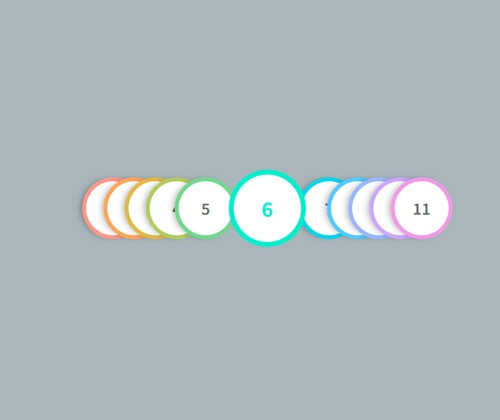
[해피CGI][cgimall] Direction-Aware Hover with Modern CSS 본문
마우스 호버 시 해당 영역이 강조되는 디자인 입니다.
캐릭터 리스트, 팀 구성원 목록 또는 참가자 목록에 유용합니다.
자세한 내용은 데모를 참고해주시기 바랍니다.
HTML
<ul class="horizontal-stack">
<li class="item" data-index="1"></li>
<li class="item" data-index="2"></li>
<li class="item" data-index="3"></li>
<li class="item" data-index="4"></li>
<li class="item" data-index="5"></li>
<li class="item" data-index="6"></li>
<li class="item" data-index="7"></li>
<li class="item" data-index="8"></li>
<li class="item" data-index="9"></li>
<li class="item" data-index="10"></li>
<li class="item" data-index="11"></li>
</ul>
|
CSS
|
*,
*::after,
*::before {
margin: 0;
padding: 0;
box-sizing: border-box;
}
:root {
--item-size: clamp(4rem, 1.2941rem + 9.4118vw, 6rem);
--overlap-offset: calc(var(--item-size) / 2);
--shadow-color: 0deg 0% 0%;
--bg-color: oklch(80% 0.15 calc((sibling-index()) * 30));
}
body {
min-block-size: 100dvh;
display: grid;
place-content: center;
background: hsl(203 12 70);
font-family: sans-serif;
}
.horizontal-stack {
cursor: pointer;
list-style: none;
display: grid;
grid-auto-flow: column;
grid-auto-columns: calc(var(--item-size) - var(--overlap-offset));
place-content: center;
padding: 2em;
}
.item {
display: grid;
place-self: center;
inline-size: var(--item-size);
block-size: var(--item-size);
border-radius: 50%;
background: var(--bg-color);
position: relative;
box-shadow: -6px 0px 10px -3px hsl(var(--shadow-color) / 0.3);
transition: transform 500ms ease;
isolation: isolate;
}
.item::before {
display: grid;
font-size: 1.5em;
place-content: center;
place-self: center;
content: attr(data-index);
font-weight: 600;
color: #6d6d6d;
position: absolute;
width: calc(100% - 0.75rem);
height: calc(100% - 0.75rem);
border-radius: inherit;
background-color: #fff;
}
.item:hover {
transform: scale(1.25);
z-index: 10;
box-shadow: unset;
filter: saturate(140%);
}
.item:hover::before {
color: var(--bg-color);
}
|

'웹프로그램밍 자료실 > 기타 자료' 카테고리의 다른 글
| [해피CGI][cgimall] 반응형이 지원되는 이미지 슬라이드 Responsive Image Slider (0) | 2026.06.10 |
|---|---|
| [해피CGI][cgimall] HTML와 CSS를 이용한 아코디언 메뉴 Awesome accordion menu using only HTML & CSS (0) | 2026.06.09 |
| [해피CGI][cgimall] Chunky 3D Buttons (0) | 2026.06.04 |
| [해피CGI][cgimall] 다양한 박물관, 미술관, 공연, 문화재 정보를 조회할 수 있는 오픈 API (0) | 2026.05.28 |
| [해피CGI][cgimall] 한국관광공사 OPEN API (0) | 2026.05.27 |
'웹프로그램밍 자료실/기타 자료' Related Articles
more


Comments