

| 일 | 월 | 화 | 수 | 목 | 금 | 토 |
|---|---|---|---|---|---|---|
| 1 | ||||||
| 2 | 3 | 4 | 5 | 6 | 7 | 8 |
| 9 | 10 | 11 | 12 | 13 | 14 | 15 |
| 16 | 17 | 18 | 19 | 20 | 21 | 22 |
| 23 | 24 | 25 | 26 | 27 | 28 | 29 |
| 30 | 31 |
- #홈페이지제작
- CSS
- 이미지
- #업종별
- happycgi
- #솔루션
- php
- 사이트제작
- jquery
- #cgimall
- 웹솔루션
- #이미지
- #뉴스
- 홈페이지
- 해피CGI
- #해피CGI
- #웹솔루션
- #동영상
- CGIMALL
- #홈페이지
- 솔루션
- #쇼핑몰
- #CSS
- #image
- #jQuery
- javascript
- 해피씨지아이
- 게시판
- 홈페이지제작
- #happycgi
- Today
- Total
웹솔루션개발 26년 노하우! 해피CGI의 모든것
[해피CGI][cgimall] 육각형(벌집) 그리드 갤러리 CSS 데모 본문
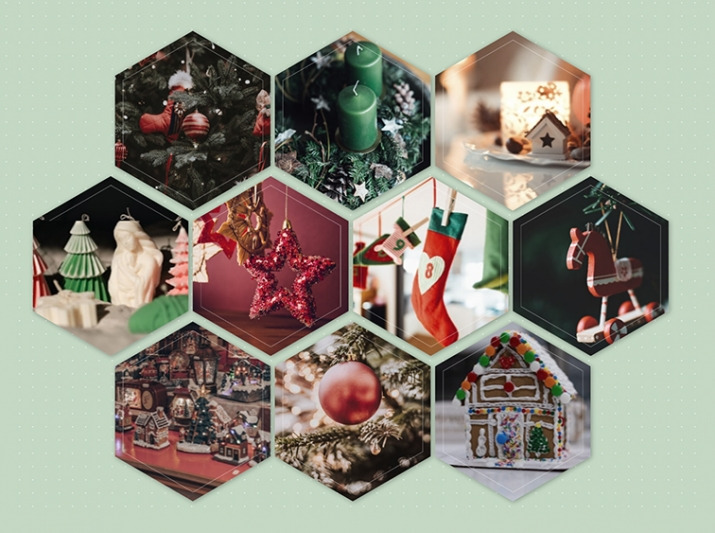
CSS Grid와 육각형 마스킹 스타일을 활용해 벌집 형태의 이미지 갤러리 레이아웃을 합니다.
각 아이템은 동일한 규칙으로 정렬되며, 호버 시 이미지 강조(확대/효과)로 시각적 집중도를 높입니다.
사용 방법은 간단합니다.
container(아이템 박스) 안에 육각형 영역에 들어갈 이미지 경로나 주소를 넣으시면 됩니다.
포트폴리오/작품 갤러리/프로젝트 썸네일 등 다양한 콘텐츠 진열 UI로 응용하기 좋습니다.
반응형 구성에도 유리해, 화면 크기에 따라 자연스럽게 레이아웃을 확장할 수 있습니다.
HTML 구조
.container
each val in ['https://images.unsplash.com/photo-1543589077-870d0ba0a43d?crop=entropy&cs=tinysrgb&fit=max&fm=jpg&ixid=M3wzMjM4NDZ8MHwxfHJhbmRvbXx8fHx8fHx8fDE3NjIyOTM4MDB8&ixlib=rb-4.1.0&q=80&w=400', 'https://images.unsplash.com/photo-1639377045919-2989217a0f04?crop=entropy&cs=tinysrgb&fit=max&fm=jpg&ixid=M3wzMjM4NDZ8MHwxfHJhbmRvbXx8fHx8fHx8fDE3NjIyOTQxMTJ8&ixlib=rb-4.1.0&q=80&w=400', 'https://images.unsplash.com/photo-1481271134264-c373cb29cf60?crop=entropy&cs=tinysrgb&fit=max&fm=jpg&ixid=M3wzMjM4NDZ8MHwxfHJhbmRvbXx8fHx8fHx8fDE3NjIyOTQwMTV8&ixlib=rb-4.1.0&q=80&w=400', 'https://images.unsplash.com/photo-1729670552768-8ec0bdb864e5?crop=entropy&cs=tinysrgb&fit=max&fm=jpg&ixid=M3wzMjM4NDZ8MHwxfHJhbmRvbXx8fHx8fHx8fDE3NjIyOTQxMTJ8&ixlib=rb-4.1.0&q=80&w=400', 'https://images.unsplash.com/photo-1512122799605-7c989cb6b5ea?crop=entropy&cs=tinysrgb&fit=max&fm=jpg&ixid=M3wzMjM4NDZ8MHwxfHJhbmRvbXx8fHx8fHx8fDE3NjIyOTQwNzV8&ixlib=rb-4.1.0&q=80&w=400', 'https://images.unsplash.com/photo-1543772857-a9d7ebc0cf63?crop=entropy&cs=tinysrgb&fit=max&fm=jpg&ixid=M3wzMjM4NDZ8MHwxfHJhbmRvbXx8fHx8fHx8fDE3NjIyOTQyNzh8&ixlib=rb-4.1.0&q=80&w=400', 'https://images.unsplash.com/photo-1547275870-de097f0cea8f?crop=entropy&cs=tinysrgb&fit=max&fm=jpg&ixid=M3wzMjM4NDZ8MHwxfHJhbmRvbXx8fHx8fHx8fDE3NjIyOTQzMTZ8&ixlib=rb-4.1.0&q=80&w=400', 'https://images.unsplash.com/photo-1701943523477-7b0b0342d9a0?crop=entropy&cs=tinysrgb&fit=max&fm=jpg&ixid=M3wzMjM4NDZ8MHwxfHJhbmRvbXx8fHx8fHx8fDE3NjIyOTQwNzV8&ixlib=rb-4.1.0&q=80&w=400', 'https://images.unsplash.com/photo-1545940982-e7c122eba937?crop=entropy&cs=tinysrgb&fit=max&fm=jpg&ixid=M3wzMjM4NDZ8MHwxfHJhbmRvbXx8fHx8fHx8fDE3NjIyOTQxMTJ8&ixlib=rb-4.1.0&q=80&w=400', 'https://images.unsplash.com/photo-1735513703744-8c32ba4ee111?crop=entropy&cs=tinysrgb&fit=max&fm=jpg&ixid=M3wzMjM4NDZ8MHwxfHJhbmRvbXx8fHx8fHx8fDE3NjIyOTQzNzh8&ixlib=rb-4.1.0&q=80&w=400']
.box
img(src=val, alt="")
CSS 소스
@import url('https://fonts.googleapis.com/css2?family=Bricolage+Grotesque:opsz,wght@12..96,200..800&display=swap');
@mixin flexCenter {
display: flex;
justify-content: center;
align-items: center;
}
*, *:after {
box-sizing: border-box;
}
html {
font-size: 100vmax / 1600 * 100;
@media (max-width: 992px) {
font-size: 60px;
}
}
body {
min-height: 100vh;
@include flexCenter;
background: #c4d8c4 radial-gradient(circle, #fff 1px, transparent 0) repeat center / 30px 30px;
font-size: 0.3rem;
font-family: "Bricolage Grotesque", sans-serif;
font-weight: bold;
}
.container {
width: 9rem;
margin: 0.5rem;
margin-top: 1rem;
display: grid;
grid-template-columns: repeat(4, 1fr);
grid-gap: 10px;
}
.box {
width: 100%;
aspect-ratio: calc(1 * sqrt(3) / 2);
position: relative;
overflow: hidden;
box-shadow: 2px 2px 12px #0005;
transition: all 0.3s;
// hexagon
border-radius: 50% / 25%;
corner-shape: bevel;
// beehive layout
margin-top: -25%;
&:nth-child(1),
&:nth-child(8) {
grid-column: 2 / 3;
}
&:nth-child(-n+3),
&:nth-child(n+8):nth-child(-n+10) {
margin-left: -50%;
}
// deco line
&:after {
content: '';
position: absolute;
width: 100%;
height: 100%;
inset: 0;
margin: auto;
border-radius: inherit;
corner-shape: inherit;
border: 1px solid #fff;
scale: 0.9;
opacity: 0.5;
pointer-events: none;
transition: all 0.3s;
will-change: scale;
}
&:hover {
img {
scale: 1.1;
filter: none;
}
&:after {
scale: 1.2; // disappear
}
}
img {
display: block;
width: 100%;
height: 100%;
object-fit: cover;
cursor: pointer;
transition: all ease 0.3s;
filter: grayscale(0.3);
will-change: scale, filter;
}
}

'웹프로그램밍 자료실 > 기타 자료' 카테고리의 다른 글
| [해피CGI][cgimall] :has()로 만드는 커스텀 커서 인터랙션 데모 (0) | 2026.02.09 |
|---|---|
| [해피CGI][cgimall] CSS: Radio Input Stars 라디오박스를 이용한 별점 (0) | 2026.02.06 |
| [해피CGI][cgimall] 3D Quantum Neural Network (0) | 2026.01.29 |
| [해피CGI][cgimall] Angled Corners via clip-path (0) | 2026.01.28 |
| [해피CGI][cgimall] swiper를 이용한 메인 이미지 슬라이드 Landing page with swiper #css #swiper.js (0) | 2026.01.27 |


