

| 일 | 월 | 화 | 수 | 목 | 금 | 토 |
|---|---|---|---|---|---|---|
| 1 | ||||||
| 2 | 3 | 4 | 5 | 6 | 7 | 8 |
| 9 | 10 | 11 | 12 | 13 | 14 | 15 |
| 16 | 17 | 18 | 19 | 20 | 21 | 22 |
| 23 | 24 | 25 | 26 | 27 | 28 | 29 |
| 30 | 31 |
Tags
- javascript
- 웹솔루션
- #뉴스
- php
- happycgi
- #image
- #happycgi
- 게시판
- 이미지
- CSS
- #솔루션
- #jQuery
- #cgimall
- 해피씨지아이
- #해피CGI
- #업종별
- #홈페이지
- 사이트제작
- jquery
- 홈페이지제작
- 솔루션
- #쇼핑몰
- #홈페이지제작
- 홈페이지
- #웹솔루션
- CGIMALL
- #이미지
- #동영상
- #CSS
- 해피CGI
- Today
- Total
웹솔루션개발 26년 노하우! 해피CGI의 모든것
[해피CGI][cgimall] 3D Quantum Neural Network 본문
Three.js와 GLSL 셰이더로 구축된 양자 신경망을 Glassmorphic UI로 구현했습니다.
자세한 내용은 데모를 참고해주시기 바랍니다.
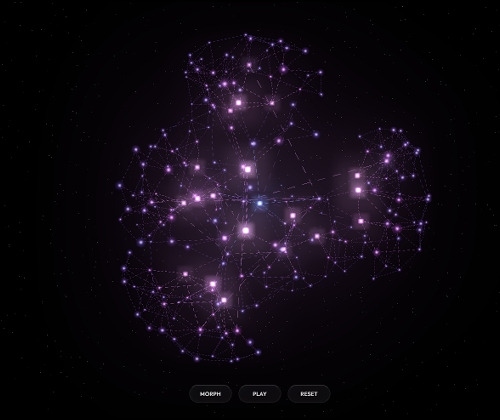
HTML
<meta charset="UTF-8">
<meta name="viewport" content="width=device-width, initial-scale=1.0">
<title>Neural Network</title>
<div id="instructions-container" class="glass-panel">
<div id="instruction-title">Quantum Neural Network</div>
<div class="instruction-text">Click to send energy pulses. <br>Drag to explore the structure.</div>
</div>
<div id="theme-selector" class="glass-panel">
<div style="flex: 1;">
<div id="theme-selector-title">Crystal Theme</div>
<div class="theme-grid">
<button class="theme-button active" id="theme-1" data-theme="0" aria-label="Purple Nebula"></button>
<button class="theme-button" id="theme-2" data-theme="1" aria-label="Sunset Fire"></button>
<button class="theme-button" id="theme-3" data-theme="2" aria-label="Ocean Aurora"></button>
</div>
</div>
<div id="density-controls" style="flex: 1;">
<div class="density-label"><span>Density</span><span id="density-value">100%</span></div>
<input type="range" min="30" max="100" value="100" class="density-slider" id="density-slider"
aria-label="Network Density" oninput="this.style.setProperty('--val', this.value + '%')">
</div>
</div>
<div id="control-buttons">
<button id="change-formation-btn" class="control-button"><span>Morph</span></button>
<button id="pause-play-btn" class="control-button"><span>Freeze</span></button>
<button id="reset-camera-btn" class="control-button"><span>Reset</span></button>
</div>
|
CSS
|
:root {
--glass-bg: rgba(255, 255, 255, 0.03);
--glass-border: rgba(255, 255, 255, 0.08);
--glass-highlight: rgba(255, 255, 255, 0.2);
--neon-accent: #667eea;
--text-main: rgba(255, 255, 255, 0.9);
--text-muted: rgba(255, 255, 255, 0.6);
}
* {
margin: 0;
padding: 0;
box-sizing: border-box;
user-select: none;
-webkit-user-select: none;
}
body {
overflow: hidden;
background: #050508;
font-family: 'Outfit', sans-serif;
color: var(--text-main);
}
canvas {
display: block;
width: 100%;
height: 100%;
cursor: crosshair;
position: absolute;
top: 0;
left: 0;
z-index: 1;
}
.glass-panel {
backdrop-filter: blur(24px) saturate(120%);
-webkit-backdrop-filter: blur(24px) saturate(120%);
background: linear-gradient(
145deg,
rgba(255, 255, 255, 0.05) 0%,
rgba(255, 255, 255, 0.01) 100%
);
border: 1px solid var(--glass-border);
border-top: 1px solid var(--glass-highlight);
border-left: 1px solid var(--glass-highlight);
box-shadow:
0 20px 40px rgba(0, 0, 0, 0.4),
inset 0 0 20px rgba(255, 255, 255, 0.02);
border-radius: 24px;
color: var(--text-main);
transition: all 0.4s cubic-bezier(0.25, 0.8, 0.25, 1);
position: absolute;
z-index: 10;
overflow: hidden;
}
.glass-panel::before {
content: '';
position: absolute;
top: 0;
left: -100%;
width: 100%;
height: 100%;
background: linear-gradient(
90deg,
transparent,
rgba(255, 255, 255, 0.05),
transparent
);
transform: skewX(-15deg);
transition: 0.5s;
pointer-events: none;
}
.glass-panel:hover {
background: linear-gradient(
145deg,
rgba(255, 255, 255, 0.08) 0%,
rgba(255, 255, 255, 0.02) 100%
);
box-shadow:
0 30px 60px rgba(0, 0, 0, 0.5),
inset 0 0 20px rgba(255, 255, 255, 0.05);
transform: translateY(-2px);
border-color: rgba(255, 255, 255, 0.15);
}
.glass-panel:hover::before {
left: 150%;
transition: 0.7s ease-in-out;
}
#instructions-container {
top: 32px;
left: 32px;
width: 280px;
padding: 24px;
}
#instruction-title {
font-weight: 500;
font-size: 18px;
margin-bottom: 8px;
letter-spacing: -0.02em;
background: linear-gradient(135deg, #fff 30%, #a5b4fc 100%);
-webkit-background-clip: text;
-webkit-text-fill-color: transparent;
text-shadow: 0 10px 20px rgba(0,0,0,0.2);
}
.instruction-text {
font-size: 14px;
line-height: 1.5;
color: var(--text-muted);
font-weight: 300;
}
#theme-selector {
top: 32px;
right: 32px;
padding: 24px;
display: flex;
flex-direction: column;
gap: 16px;
width: 220px;
}
#theme-selector-title {
font-size: 12px;
text-transform: uppercase;
letter-spacing: 2px;
color: var(--text-muted);
font-weight: 600;
margin-bottom: 4px;
}
.theme-grid {
display: grid;
grid-template-columns: repeat(3, 1fr);
gap: 12px;
justify-items: center;
}
.theme-button {
width: 44px;
height: 44px;
border-radius: 50%;
border: none;
cursor: pointer;
position: relative;
transition: all 0.4s cubic-bezier(0.34, 1.56, 0.64, 1);
box-shadow:
0 4px 10px rgba(0,0,0,0.3),
inset 0 2px 4px rgba(255,255,255,0.4),
inset 0 -2px 4px rgba(0,0,0,0.2);
}
#theme-1 { background: radial-gradient(circle at 30% 30%, #a78bfa, #4c1d95); }
#theme-2 { background: radial-gradient(circle at 30% 30%, #fb7185, #9f1239); }
#theme-3 { background: radial-gradient(circle at 30% 30%, #38bdf8, #0c4a6e); }
.theme-button::after {
content: '';
position: absolute;
top: -4px;
left: -4px;
right: -4px;
bottom: -4px;
border-radius: 50%;
border: 2px solid rgba(255,255,255,0.8);
opacity: 0;
transform: scale(1.1);
transition: all 0.3s ease;
}
.theme-button:hover {
transform: scale(1.15) translateY(-2px);
box-shadow: 0 8px 20px rgba(0,0,0,0.4), inset 0 2px 6px rgba(255,255,255,0.6);
}
.theme-button.active::after {
opacity: 1;
transform: scale(1);
border-color: rgba(255,255,255,0.9);
box-shadow: 0 0 15px rgba(255,255,255,0.3);
}
#density-controls {
display: flex;
flex-direction: column;
gap: 12px;
margin-top: 8px;
}
.density-label {
display: flex;
justify-content: space-between;
font-size: 13px;
color: var(--text-muted);
font-weight: 300;
}
#density-value {
color: white;
font-weight: 500;
text-shadow: 0 0 10px rgba(255,255,255,0.3);
}
.density-slider {
-webkit-appearance: none;
width: 100%;
height: 6px;
background: rgba(255,255,255,0.1);
border-radius: 10px;
outline: none;
box-shadow: inset 0 1px 2px rgba(0,0,0,0.3);
}
.density-slider::-webkit-slider-thumb {
-webkit-appearance: none;
width: 18px;
height: 18px;
border-radius: 50%;
background: #fff;
cursor: pointer;
box-shadow:
0 0 15px rgba(255,255,255,0.8),
0 2px 5px rgba(0,0,0,0.3);
transition: all 0.2s ease;
margin-top: -6px;
position: relative;
z-index: 2;
}
.density-slider::-webkit-slider-runnable-track {
width: 100%;
height: 6px;
cursor: pointer;
background: linear-gradient(90deg, rgba(255,255,255,0.3) var(--val, 100%), rgba(255,255,255,0.05) var(--val, 100%));
border-radius: 3px;
}
.density-slider::-webkit-slider-thumb:hover {
transform: scale(1.2);
box-shadow: 0 0 20px rgba(255,255,255,1);
}
#control-buttons {
position: absolute;
bottom: 40px;
left: 50%;
transform: translateX(-50%);
display: flex;
gap: 16px;
z-index: 20;
padding: 8px;
background: rgba(0,0,0,0.1);
}
.control-button {
backdrop-filter: blur(20px) saturate(140%);
-webkit-backdrop-filter: blur(20px) saturate(140%);
background: rgba(255, 255, 255, 0.04);
border: 1px solid rgba(255, 255, 255, 0.1);
border-top: 1px solid rgba(255, 255, 255, 0.25);
color: var(--text-main);
padding: 12px 24px;
border-radius: 50px;
cursor: pointer;
font-family: 'Outfit', sans-serif;
font-size: 13px;
font-weight: 500;
letter-spacing: 0.5px;
text-transform: uppercase;
transition: all 0.3s ease;
box-shadow:
0 8px 20px rgba(0, 0, 0, 0.3),
inset 0 0 10px rgba(255,255,255,0.02);
overflow: hidden;
position: relative;
min-width: 100px;
text-align: center;
}
.control-button:hover {
background: rgba(255, 255, 255, 0.1);
border-color: rgba(255, 255, 255, 0.4);
transform: translateY(-4px);
box-shadow:
0 15px 30px rgba(0, 0, 0, 0.4),
0 0 20px rgba(255, 255, 255, 0.1);
text-shadow: 0 0 8px rgba(255,255,255,0.6);
}
.control-button:active {
transform: translateY(-1px);
}
.control-button span {
position: relative;
z-index: 2;
}
@media (max-width: 640px) {
#instructions-container {
top: 16px;
left: 16px;
right: 16px;
width: auto;
padding: 16px;
background: rgba(10, 10, 15, 0.6);
}
#theme-selector {
top: auto;
bottom: 100px;
left: 16px;
right: 16px;
width: auto;
padding: 16px;
flex-direction: row;
align-items: center;
justify-content: space-between;
}
.theme-grid {
margin-top: 0;
}
#control-buttons {
bottom: 24px;
width: 100%;
justify-content: center;
gap: 8px;
padding: 0 16px;
}
.control-button {
padding: 10px 16px;
min-width: auto;
font-size: 11px;
flex: 1;
}
}
|

'웹프로그램밍 자료실 > 기타 자료' 카테고리의 다른 글
| [해피CGI][cgimall] CSS: Radio Input Stars 라디오박스를 이용한 별점 (0) | 2026.02.06 |
|---|---|
| [해피CGI][cgimall] 육각형(벌집) 그리드 갤러리 CSS 데모 (0) | 2026.02.05 |
| [해피CGI][cgimall] Angled Corners via clip-path (0) | 2026.01.28 |
| [해피CGI][cgimall] swiper를 이용한 메인 이미지 슬라이드 Landing page with swiper #css #swiper.js (0) | 2026.01.27 |
| [해피CGI][cgimall] 반응형이 지원되는 음악 미디어 플레이어 Responsive Audio Player (0) | 2026.01.26 |
'웹프로그램밍 자료실/기타 자료' Related Articles
more


Comments