

| 일 | 월 | 화 | 수 | 목 | 금 | 토 |
|---|---|---|---|---|---|---|
| 1 | ||||||
| 2 | 3 | 4 | 5 | 6 | 7 | 8 |
| 9 | 10 | 11 | 12 | 13 | 14 | 15 |
| 16 | 17 | 18 | 19 | 20 | 21 | 22 |
| 23 | 24 | 25 | 26 | 27 | 28 | 29 |
| 30 | 31 |
- #솔루션
- jquery
- #jQuery
- 홈페이지제작
- #뉴스
- 솔루션
- #happycgi
- 홈페이지
- php
- 이미지
- #해피CGI
- #쇼핑몰
- CGIMALL
- CSS
- #cgimall
- #홈페이지제작
- happycgi
- #이미지
- 해피씨지아이
- #업종별
- 사이트제작
- #동영상
- #image
- 해피CGI
- #홈페이지
- 게시판
- 웹솔루션
- #CSS
- #웹솔루션
- javascript
- Today
- Total
웹솔루션개발 26년 노하우! 해피CGI의 모든것
[해피CGI][cgimall] 3D 이미지 큐브 갤러리 인터랙션 효과 본문
여러 개의 이미지를 3D 큐브 형태로 배치하여 마우스 움직임에 따라 입체적으로 반응하는
이미지 갤러리 효과를 구현한 예제입니다.
사용자가 마우스를 움직이면 이미지가 자연스럽게 이동하거나 강조되어 보여지며,
일반적인 이미지 목록보다 더 생동감 있는 화면 구성을 만들 수 있습니다.
포트폴리오 페이지, 작품 갤러리, 상품 소개 페이지 등에서
시각적으로 흥미로운 콘텐츠 표현을 위해 활용할 수 있는 인터랙션 효과입니다.
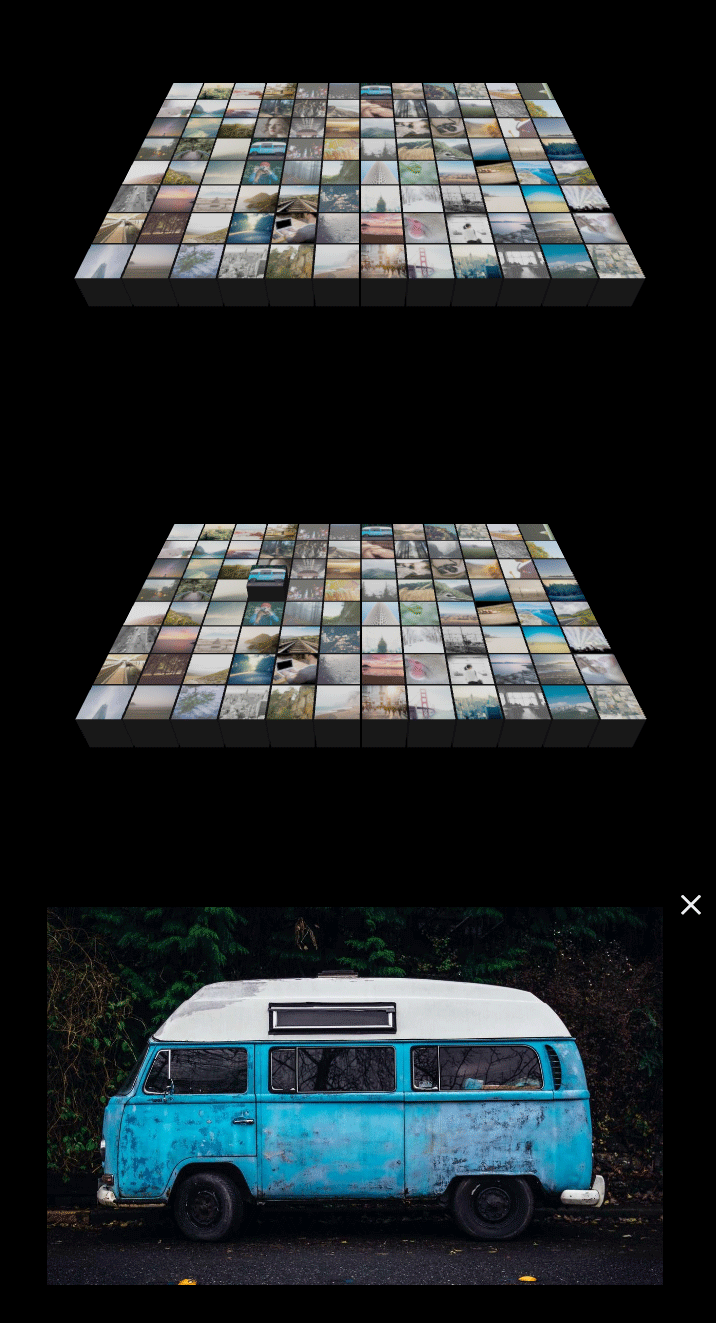
HTML 구조
<!-- Lightbox HTML -->
<div id="lightbox">
<div id="close-btn">×</div>
<img id="lightbox-img" src="" alt="Fullsize">
</div>
<script type="importmap">
{
"imports": {
"three": "https://unpkg.com/three@0.160.0/build/three.module.js",
"three/addons/": "https://unpkg.com/three@0.160.0/examples/jsm/"
}
}
</script>
CSS 소스
body { margin: 0; overflow: hidden; background-color: #000; }
canvas { display: block; }
/* Lightbox styles */
#lightbox {
display: none; /* Hidden by default */
position: fixed;
z-index: 1000;
top: 0;
left: 0;
width: 100%;
height: 100%;
background-color: rgba(0, 0, 0, 0.9);
justify-content: center;
align-items: center;
opacity: 0;
transition: opacity 0.3s ease;
}
#lightbox.active {
display: flex; /* Use flex to center content */
opacity: 1;
}
#lightbox img {
max-width: 90%;
max-height: 90%;
}
#close-btn {
position: absolute;
top: 20px;
right: 40px;
color: #fff;
font-size: 30px;
cursor: pointer;
font-family: sans-serif;
user-select: none;
}
JS 소스
import * as THREE from 'three';
import { OrbitControls } from 'three/addons/controls/OrbitControls.js';
// === 1. SCENE SETUP ===
const scene = new THREE.Scene();
scene.background = new THREE.Color(0x000000);
const camera = new THREE.PerspectiveCamera(45, window.innerWidth / window.innerHeight, 1, 2000);
camera.position.set(0, 100, 120);
const renderer = new THREE.WebGLRenderer({ antialias: true });
renderer.setSize(window.innerWidth, window.innerHeight);
renderer.setPixelRatio(window.devicePixelRatio); // For high DPI screens
document.body.appendChild(renderer.domElement);
const controls = new OrbitControls(camera, renderer.domElement);
controls.enableDamping = true; // Inertia
controls.dampingFactor = 0.05;
controls.minDistance = 50;
controls.maxDistance = 500;
controls.maxPolarAngle = Math.PI / 2; // Prevent camera from going under the grid
// Lighting
const ambientLight = new THREE.AmbientLight(0xffffff, 1.0);
scene.add(ambientLight);
const dirLight = new THREE.DirectionalLight(0xffffff, 1.5);
dirLight.position.set(20, 80, 50);
scene.add(dirLight);
// === 2. CUBE GENERATION ===
const cols = 12;
const rows = 8;
const cubeSize = 10;
const gap = 0.5;
const step = cubeSize + gap;
// Calculate grid dimensions to center it
const gridWidth = cols * step - gap;
const gridDepth = rows * step - gap;
const startX = -gridWidth / 2 + cubeSize / 2;
const startZ = -gridDepth / 2 + cubeSize / 2;
const cubes = [];
const textureLoader = new THREE.TextureLoader();
const sideMaterial = new THREE.MeshLambertMaterial({ color: 0x222222 }); // Dark grey sides
const geometry = new THREE.BoxGeometry(cubeSize, cubeSize, cubeSize);
for (let i = 0; i < cols; i++) {
for (let j = 0; j < rows; j++) {
// Use 'seed' to get the same image for thumbnail and full size
const seed = `img_${i}_${j}`;
const thumbUrl = `https://picsum.photos/seed/${seed}/200/200`; // Low res for texture
const fullUrl = `https://picsum.photos/seed/${seed}/1200/800`; // High res for lightbox
const texture = textureLoader.load(thumbUrl);
texture.anisotropy = renderer.capabilities.getMaxAnisotropy();
const topMaterial = new THREE.MeshLambertMaterial({ map: texture });
// Material array: [Right, Left, Top, Bottom, Front, Back]
const materials = [
sideMaterial, sideMaterial,
topMaterial, // Top face has the image
sideMaterial, sideMaterial, sideMaterial
];
const cube = new THREE.Mesh(geometry, materials);
// Positioning
cube.position.x = startX + i * step;
cube.position.z = startZ + j * step;
cube.position.y = 0;
// Store custom data for animation and lightbox
cube.userData = {
targetY: 0,
fullUrl: fullUrl
};
scene.add(cube);
cubes.push(cube);
}
}
// === 3. RAYCASTING SETUP ===
const raycaster = new THREE.Raycaster();
const mouse = new THREE.Vector2(9999, 9999); // Start off-screen
let hoveredCube = null;
function onMouseMove(event) {
// Normalize mouse coordinates (-1 to +1)
mouse.x = (event.clientX / window.innerWidth) * 2 - 1;
mouse.y = -(event.clientY / window.innerHeight) * 2 + 1;
}
window.addEventListener('mousemove', onMouseMove, false);
// === 4. CLICK HANDLERS & LIGHTBOX ===
const mouseDownPos = new THREE.Vector2();
// Track mouse down position
window.addEventListener('mousedown', (event) => {
mouseDownPos.x = event.clientX;
mouseDownPos.y = event.clientY;
});
const lightbox = document.getElementById('lightbox');
const lightboxImg = document.getElementById('lightbox-img');
const closeBtn = document.getElementById('close-btn');
function openLightbox(url) {
lightboxImg.src = url;
lightbox.style.display = 'flex';
requestAnimationFrame(() => lightbox.classList.add('active'));
}
function closeLightbox() {
lightbox.classList.remove('active');
setTimeout(() => {
lightbox.style.display = 'none';
lightboxImg.src = "";
}, 300); // Wait for transition
}
window.addEventListener('click', (event) => {
// Calculate distance between mousedown and mouseup
const dx = event.clientX - mouseDownPos.x;
const dy = event.clientY - mouseDownPos.y;
const distance = Math.sqrt(dx * dx + dy * dy);
// If moved less than 5px, treat as a click. Otherwise, it's a drag (camera control).
if (distance < 5 && hoveredCube) {
openLightbox(hoveredCube.userData.fullUrl);
}
});
// Close on background click or close button
lightbox.addEventListener('click', (e) => {
if (e.target !== lightboxImg) closeLightbox();
});
closeBtn.addEventListener('click', closeLightbox);
// === 5. ANIMATION LOOP ===
function animate() {
requestAnimationFrame(animate);
controls.update();
// LOGIC: Check intersection with actual cubes
raycaster.setFromCamera(mouse, camera);
const intersects = raycaster.intersectObjects(cubes);
if (intersects.length > 0) {
// Get the first (closest) cube
hoveredCube = intersects[0].object;
} else {
hoveredCube = null;
}
// Update cursor style
if (hoveredCube) {
document.body.style.cursor = 'pointer';
} else {
document.body.style.cursor = 'default';
}
// Animate cubes
cubes.forEach(cube => {
if (cube === hoveredCube) {
// Lift height set to 5
cube.userData.targetY = 5;
} else {
cube.userData.targetY = 0;
}
// Smooth interpolation (Lerp)
cube.position.y += (cube.userData.targetY - cube.position.y) * 0.15;
});
renderer.render(scene, camera);
}
// Handle window resize
window.addEventListener('resize', () => {
camera.aspect = window.innerWidth / window.innerHeight;
camera.updateProjectionMatrix();
renderer.setSize(window.innerWidth, window.innerHeight);
});
animate();

'웹프로그램밍 자료실 > 기타 자료' 카테고리의 다른 글
| [해피CGI][cgimall] 개발자를 위한 5,600개 이상의 브랜드 SVG 아이콘 – theSVG (0) | 2026.05.20 |
|---|---|
| [해피CGI][cgimall] Pill Toggle - cpc-true-false 커스텀 토글 버튼 (0) | 2026.05.15 |
| [해피CGI][cgimall] CSS만으로 구현한 인터랙티브 3D 카드 효과 (0) | 2026.05.13 |
| [해피CGI][cgimall] Infinite Gallery Hall (0) | 2026.05.08 |
| [해피CGI][cgimall] Holographic Glitch CSS only (0) | 2026.05.07 |


