

| 일 | 월 | 화 | 수 | 목 | 금 | 토 |
|---|---|---|---|---|---|---|
| 1 | 2 | 3 | ||||
| 4 | 5 | 6 | 7 | 8 | 9 | 10 |
| 11 | 12 | 13 | 14 | 15 | 16 | 17 |
| 18 | 19 | 20 | 21 | 22 | 23 | 24 |
| 25 | 26 | 27 | 28 | 29 | 30 | 31 |
- 웹솔루션
- javascript
- 이미지
- php
- #웹솔루션
- #뉴스
- 해피CGI
- CGIMALL
- #CSS
- #업종별
- #jQuery
- 홈페이지
- 웹사이트제작
- #image
- CSS
- #솔루션
- #홈페이지제작
- #쇼핑몰
- #happycgi
- 솔루션
- #이미지
- #홈페이지
- #cgimall
- jquery
- 사이트제작
- 해피씨지아이
- 홈페이지제작
- #해피CGI
- 게시판
- happycgi
- Today
- Total
웹솔루션개발 26년 노하우! 해피CGI의 모든것
[해피CGI][cgimall] 이미지가 자연스럽게 전환되는 갤러리 본문
React 기반으로 제작된 이미지 갤러리 예제로, 이미지 간 전환 과정에 시각적인 모프 효과를 적용한 것이 특징입니다.
화면 좌우의 이전·다음 버튼을 통해 이미지를 순차적으로 전환할 수 있으며, 하단 썸네일을 선택해 원하는 이미지로 바로 이동할 수도 있습니다.
모바일 화면에서는 썸네일 영역을 숨기고 좌우 탐색 버튼을 유지하는 방식으로 반응형 처리되어 있습니다.
포트폴리오, 제품 이미지, 사진 전시 등 이미지 중심의 웹페이지에서 활용하기 좋은 갤러리 입니다.
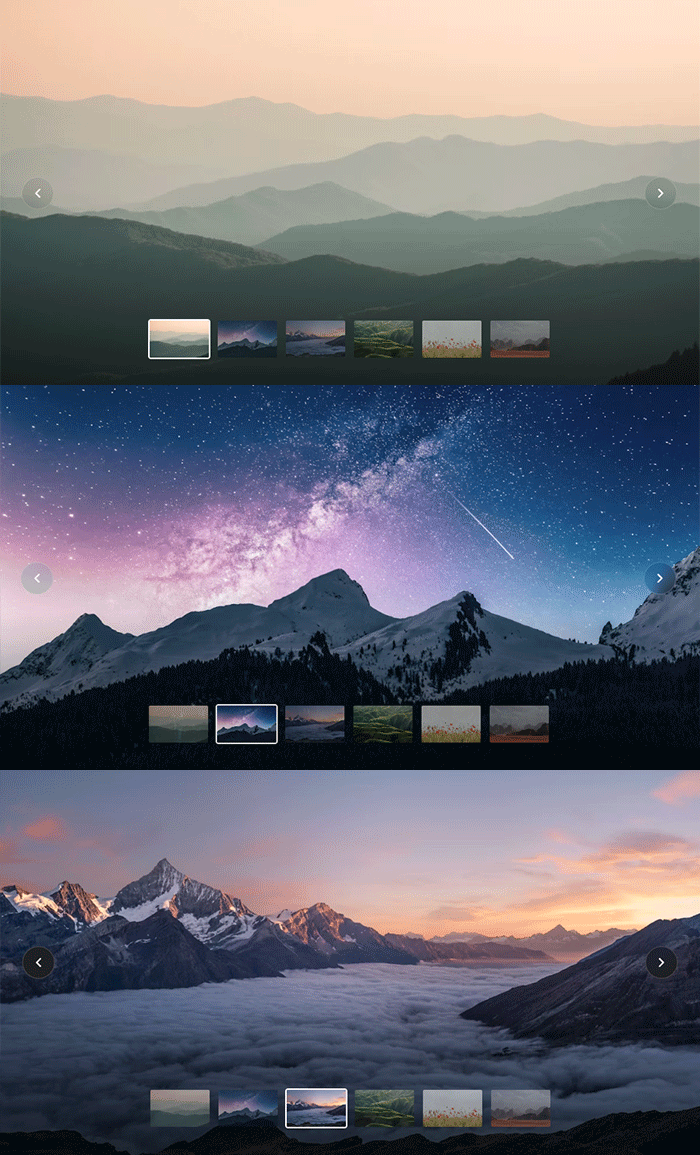
HTML 구조
<div id="root"></div>
CSS 소스
.root {
width: 100%;
height: 100dvh;
overflow: hidden;
}
.root > div {
width: 100%;
height: 100%;
}
.stage {
position: relative;
width: 100%;
height: 100%;
}
.stage::after {
content: "";
position: absolute;
inset: auto 0 0;
height: 220px;
background: linear-gradient(to bottom, transparent, rgb(0 0 0 / 65%));
pointer-events: none;
z-index: 5;
}
.canvas {
position: absolute;
inset: 0;
display: block;
width: 100%;
height: 100%;
}
.navPrev,
.navNext {
backdrop-filter: contrast(2) brightness(0.7) blur(10px);
position: absolute;
top: 50%;
transform: translateY(-50%);
width: 44px;
height: 44px;
border-radius: 50%;
background: rgb(255 255 255 / 12%);
border: 1px solid rgb(255 255 255 / 18%);
color: #fff;
display: flex;
align-items: center;
justify-content: center;
cursor: pointer;
z-index: 10;
transition:
background 0.2s ease,
opacity 0.2s ease;
}
.navPrev:hover,
.navNext:hover {
background: rgb(255 255 255 / 22%);
}
.navPrev:disabled,
.navNext:disabled {
opacity: 0.25;
pointer-events: none;
}
.navPrev {
left: 2rem;
}
.navNext {
right: 2rem;
}
.thumbs {
position: absolute;
bottom: 2rem;
left: 0;
right: 0;
margin: 0 auto;
width: max-content;
max-width: calc(100% - 2rem);
display: flex;
gap: 8px;
list-style: none;
padding: 0 0 10px 0;
z-index: 10;
overflow-x: auto;
scroll-behavior: smooth;
}
.thumbs::-webkit-scrollbar {
height: 6px;
}
.thumbs::-webkit-scrollbar-track {
background: rgb(255 255 255 / 10%);
border-radius: 4px;
}
.thumbs::-webkit-scrollbar-thumb {
background: rgb(255 255 255 / 30%);
border-radius: 4px;
}
.thumbItem {
list-style: none;
flex-shrink: 0;
}
.thumbButton {
display: block;
padding: 0;
border: 2px solid transparent;
border-radius: 4px;
cursor: pointer;
overflow: hidden;
background: none;
transition:
border-color 0.2s ease,
opacity 0.2s ease;
opacity: 0.55;
}
.thumbButton[aria-current="true"] {
border-color: #fff;
opacity: 1;
}
.thumbButton:hover {
opacity: 0.85;
}
.thumbButton img {
display: block;
width: 80px;
height: 50px;
object-fit: cover;
}
.srOnly {
position: absolute;
width: 1px;
height: 1px;
padding: 0;
margin: -1px;
overflow: hidden;
clip: rect(0, 0, 0, 0);
white-space: nowrap;
border-width: 0;
}
@media (max-width: 600px) {
.thumbs {
display: none;
}
.navPrev {
left: 1rem;
}
.navNext {
right: 1rem;
}
}
JS 소스
import React, { useState, useRef, useEffect } from "https://esm.sh/react";
import { createRoot }from "https://esm.sh/react-dom/client";
import {
Gallery,
GalleryNav,
GalleryPagination,
GalleryPaginationItem,
useGallery,
} from "https://esm.sh/@wethegit/react-gallery@4.0.2";
console.clear();
const ITEMS = [
{
id: 1,
image:
"https://images.unsplash.com/photo-1500534314209-a25ddb2bd429?auto=format&fit=crop&w=1200&h=700&q=80",
thumb:
"https://images.unsplash.com/photo-1500534314209-a25ddb2bd429?auto=format&fit=crop&w=200&h=120&q=60",
alt: "Sun rays through a forest",
},
{
id: 2,
image:
"https://images.unsplash.com/photo-1519681393784-d120267933ba?auto=format&fit=crop&w=1200&h=700&q=80",
thumb:
"https://images.unsplash.com/photo-1519681393784-d120267933ba?auto=format&fit=crop&w=200&h=120&q=60",
alt: "Snow-capped mountain peak at night",
},
{
id: 3,
image:
"https://images.unsplash.com/photo-1506905925346-21bda4d32df4?auto=format&fit=crop&w=1200&h=700&q=80",
thumb:
"https://images.unsplash.com/photo-1506905925346-21bda4d32df4?auto=format&fit=crop&w=200&h=120&q=60",
alt: "Mountain reflected in a still lake",
},
{
id: 4,
image:
"https://images.unsplash.com/photo-1501854140801-50d01698950b?auto=format&fit=crop&w=1200&h=700&q=80",
thumb:
"https://images.unsplash.com/photo-1501854140801-50d01698950b?auto=format&fit=crop&w=200&h=120&q=60",
alt: "Aerial view of green hills",
},
{
id: 5,
image:
"https://images.unsplash.com/photo-1465146344425-f00d5f5c8f07?auto=format&fit=crop&w=1200&h=700&q=80",
thumb:
"https://images.unsplash.com/photo-1465146344425-f00d5f5c8f07?auto=format&fit=crop&w=200&h=120&q=60",
alt: "Orange wildflower field",
},
{
id: 6,
image:
"https://images.unsplash.com/photo-1547234935-80c7145ec969?auto=format&fit=crop&w=1200&h=700&q=80",
thumb:
"https://images.unsplash.com/photo-1547234935-80c7145ec969?auto=format&fit=crop&w=200&h=120&q=60",
alt: "Tropical beach with clear water",
},
]
...이하생략 소스다운로드 참조

'웹프로그램밍 자료실 > 기타 자료' 카테고리의 다른 글
| [해피CGI][cgimall] 마우스 오버로 확장되는 벤토 그리드 갤러리 (0) | 2026.10.30 |
|---|---|
| [해피CGI][cgimall] 입체적인 이미지 카드 캐러셀 (0) | 2026.10.12 |
| [해피CGI][cgimall] 움직이는 인풋 버튼 애니메이션 Material Radio Button (0) | 2026.10.08 |
| [해피CGI][cgimall] 스킬을 표현하기 좋은 애니메이션 소스 Stats animation (0) | 2026.10.07 |
| [해피CGI][cgimall] CSS로 구현하는 순차 등장 애니메이션 (0) | 2026.10.06 |


