

| 일 | 월 | 화 | 수 | 목 | 금 | 토 |
|---|---|---|---|---|---|---|
| 1 | ||||||
| 2 | 3 | 4 | 5 | 6 | 7 | 8 |
| 9 | 10 | 11 | 12 | 13 | 14 | 15 |
| 16 | 17 | 18 | 19 | 20 | 21 | 22 |
| 23 | 24 | 25 | 26 | 27 | 28 | 29 |
| 30 | 31 |
Tags
- jquery
- #쇼핑몰
- 홈페이지
- #솔루션
- javascript
- #업종별
- #동영상
- 홈페이지제작
- #웹솔루션
- #image
- happycgi
- #이미지
- #해피CGI
- 해피씨지아이
- CGIMALL
- 사이트제작
- CSS
- #뉴스
- #홈페이지제작
- php
- #happycgi
- #jQuery
- 게시판
- 해피CGI
- 솔루션
- #cgimall
- #홈페이지
- 웹솔루션
- 이미지
- #CSS
- Today
- Total
웹솔루션개발 26년 노하우! 해피CGI의 모든것
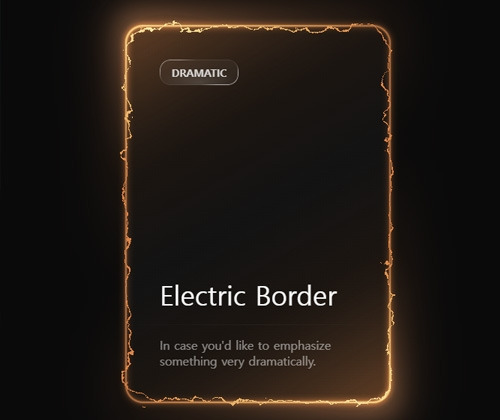
[해피CGI][cgimall] Electric Border 본문
웹 사이트 꾸미기에 적합한 효과입니다.
카드 디자인에 어울릴거 같습니다.
자세한 내용은 데모를 참고해 주시기 바랍니다.
HTML
<main class="main-container">
<svg class="svg-container">
<defs>
<filter id="turbulent-displace" colorInterpolationFilters="sRGB" x="-20%" y="-20%" width="140%" height="140%">
<feTurbulence type="turbulence" baseFrequency="0.02" numOctaves="10" result="noise1" seed="1" />
<feOffset in="noise1" dx="0" dy="0" result="offsetNoise1">
<animate attributeName="dy" values="700; 0" dur="6s" repeatCount="indefinite" calcMode="linear" />
</feOffset>
<feTurbulence type="turbulence" baseFrequency="0.02" numOctaves="10" result="noise2" seed="1" />
<feOffset in="noise2" dx="0" dy="0" result="offsetNoise2">
<animate attributeName="dy" values="0; -700" dur="6s" repeatCount="indefinite" calcMode="linear" />
</feOffset>
<feTurbulence type="turbulence" baseFrequency="0.02" numOctaves="10" result="noise1" seed="2" />
<feOffset in="noise1" dx="0" dy="0" result="offsetNoise3">
<animate attributeName="dx" values="490; 0" dur="6s" repeatCount="indefinite" calcMode="linear" />
</feOffset>
<feTurbulence type="turbulence" baseFrequency="0.02" numOctaves="10" result="noise2" seed="2" />
<feOffset in="noise2" dx="0" dy="0" result="offsetNoise4">
<animate attributeName="dx" values="0; -490" dur="6s" repeatCount="indefinite" calcMode="linear" />
</feOffset>
<feComposite in="offsetNoise1" in2="offsetNoise2" result="part1" />
<feComposite in="offsetNoise3" in2="offsetNoise4" result="part2" />
<feBlend in="part1" in2="part2" mode="color-dodge" result="combinedNoise" />
<feDisplacementMap in="SourceGraphic" in2="combinedNoise" scale="30" xChannelSelector="R" yChannelSelector="B" />
</filter>
</defs>
</svg>
<div class="card-container">
<div class="inner-container">
<div class="border-outer">
<div class="main-card"></div>
</div>
<div class="glow-layer-1"></div>
<div class="glow-layer-2"></div>
</div>
<div class="overlay-1"></div>
<div class="overlay-2"></div>
<div class="background-glow"></div>
<div class="content-container">
<div class="content-top">
<div class="scrollbar-glass">
Dramatic
</div>
<p class="title">Electric Border</p>
</div>
<hr class="divider" />
<div class="content-bottom">
<p class="description">In case you'd like to emphasize something very dramatically.</p>
</div>
</div>
</div>
</main>
|
CSS
/* Reset and base styles */
/* CSS Variables */
:root {
--electric-border-color: #dd8448;
--electric-light-color: oklch(from var(--electric-border-color) l c h);
--gradient-color: oklch(
from var(--electric-border-color) 0.3 calc(c / 2) h / 0.4
);
--color-neutral-900: oklch(0.185 0 0);
}
* {
margin: 0;
padding: 0;
box-sizing: border-box;
}
body {
font-family: system-ui, -apple-system, sans-serif;
background-color: oklch(0.145 0 0);
color: oklch(0.985 0 0);
height: 100vh;
overflow: hidden;
}
/* Main container */
.main-container {
display: flex;
flex-direction: column;
align-items: center;
justify-content: center;
height: 100vh;
}
/* SVG positioning */
.svg-container {
position: absolute;
}
/* Card container */
.card-container {
padding: 2px;
border-radius: 24px;
position: relative;
background: linear-gradient(
-30deg,
var(--gradient-color),
transparent,
var(--gradient-color)
),
linear-gradient(
to bottom,
var(--color-neutral-900),
var(--color-neutral-900)
);
}
/* Inner container */
.inner-container {
position: relative;
}
/* Border layers */
.border-outer {
border: 2px solid rgba(221, 132, 72, 0.5);
border-radius: 24px;
padding-right: 4px;
padding-bottom: 4px;
}
.main-card {
width: 350px;
height: 500px;
border-radius: 24px;
border: 2px solid var(--electric-border-color);
margin-top: -4px;
margin-left: -4px;
filter: url(#turbulent-displace);
}
/* Glow effects */
.glow-layer-1 {
border: 2px solid rgba(221, 132, 72, 0.6);
border-radius: 24px;
width: 100%;
height: 100%;
position: absolute;
top: 0;
left: 0;
right: 0;
bottom: 0;
filter: blur(1px);
}
.glow-layer-2 {
border: 2px solid var(--electric-light-color);
border-radius: 24px;
width: 100%;
height: 100%;
position: absolute;
top: 0;
left: 0;
right: 0;
bottom: 0;
filter: blur(4px);
}
/* Overlay effects */
.overlay-1 {
position: absolute;
width: 100%;
height: 100%;
top: 0;
left: 0;
right: 0;
bottom: 0;
border-radius: 24px;
opacity: 1;
mix-blend-mode: overlay;
transform: scale(1.1);
filter: blur(16px);
background: linear-gradient(
-30deg,
white,
transparent 30%,
transparent 70%,
white
);
}
.overlay-2 {
position: absolute;
width: 100%;
height: 100%;
top: 0;
left: 0;
right: 0;
bottom: 0;
border-radius: 24px;
opacity: 0.5;
mix-blend-mode: overlay;
transform: scale(1.1);
filter: blur(16px);
background: linear-gradient(
-30deg,
white,
transparent 30%,
transparent 70%,
white
);
}
/* Background glow */
.background-glow {
position: absolute;
width: 100%;
height: 100%;
top: 0;
left: 0;
right: 0;
bottom: 0;
border-radius: 24px;
filter: blur(32px);
transform: scale(1.1);
opacity: 0.3;
z-index: -1;
background: linear-gradient(
-30deg,
var(--electric-light-color),
transparent,
var(--electric-border-color)
);
}
/* Content container */
.content-container {
position: absolute;
top: 0;
left: 0;
right: 0;
bottom: 0;
width: 100%;
height: 100%;
display: flex;
flex-direction: column;
}
/* Content sections */
.content-top {
display: flex;
flex-direction: column;
padding: 48px;
padding-bottom: 16px;
height: 100%;
}
.content-bottom {
display: flex;
flex-direction: column;
padding: 48px;
padding-top: 16px;
}
/* Scrollbar glass component */
.scrollbar-glass {
background: radial-gradient(
47.2% 50% at 50.39% 88.37%,
rgba(255, 255, 255, 0.12) 0%,
rgba(255, 255, 255, 0) 100%
),
rgba(255, 255, 255, 0.04);
position: relative;
transition: background 0.3s ease;
border-radius: 14px;
width: fit-content;
height: fit-content;
padding: 8px 16px;
text-transform: uppercase;
font-weight: bold;
font-size: 14px;
color: rgba(255, 255, 255, 0.8);
}
.scrollbar-glass:hover {
background: radial-gradient(
47.2% 50% at 50.39% 88.37%,
rgba(255, 255, 255, 0.12) 0%,
rgba(255, 255, 255, 0) 100%
),
rgba(255, 255, 255, 0.08);
}
.scrollbar-glass::before {
content: "";
position: absolute;
top: 0;
left: 0;
right: 0;
bottom: 0;
padding: 1px;
background: linear-gradient(
150deg,
rgba(255, 255, 255, 0.48) 16.73%,
rgba(255, 255, 255, 0.08) 30.2%,
rgba(255, 255, 255, 0.08) 68.2%,
rgba(255, 255, 255, 0.6) 81.89%
);
border-radius: inherit;
mask: linear-gradient(#fff 0 0) content-box, linear-gradient(#fff 0 0);
mask-composite: xor;
-webkit-mask-composite: xor;
pointer-events: none;
}
/* Typography */
.title {
font-size: 36px;
font-weight: 500;
margin-top: auto;
}
.description {
opacity: 0.5;
}
/* Divider */
.divider {
margin-top: auto;
border: none;
height: 1px;
background-color: currentColor;
opacity: 0.1;
mask-image: linear-gradient(to right, transparent, black, transparent);
-webkit-mask-image: linear-gradient(
to right,
transparent,
black,
transparent
);
}
|

'웹프로그램밍 자료실 > 기타 자료' 카테고리의 다른 글
| [해피CGI][cgimall] 반응형이 지원되는 음악 미디어 플레이어 Responsive Audio Player (0) | 2026.01.26 |
|---|---|
| [해피CGI][cgimall] CSS Grid Generator 그리드 레이아웃 코드 생성 (0) | 2026.01.15 |
| [해피CGI][cgimall] Interactive Blackhole (0) | 2025.12.19 |
| [해피CGI][cgimall] 로딩되기 전에 애니메이션 구현하기 Skeleton loading using only a few lines of CSS (0) | 2025.12.18 |
| [해피CGI][cgimall] 클릭하면 아이콘이 나오는 바 애니메이션 Chat Bar Interaction (0) | 2025.12.17 |
'웹프로그램밍 자료실/기타 자료' Related Articles
more


Comments